
You plug in your phone and watch the battery creep from 5% to 15% in what feels like forever. Sound familiar? Then you’ve probably heard the term fast charging — but knowing what it means and how to identify a fast charger that actually delivers on that promise is a different story.
Fast charging technology has quietly transformed the way we use our phones, laptops, earbuds, and tablets. Yet most people are still using a slow charger from three years ago and wondering why their battery barely budges during a lunch break.
This guide cuts through the confusion. Whether you’re shopping for a new charger, digging through an old drawer full of cables, or just trying to understand what all those watts and volts actually mean — you’re in the right place.
What Is Fast Charging, Exactly?
Fast charging is any charging technology that delivers power to a device significantly faster than the standard USB charging rate of 5 watts (5V/1A).
Think of it like a garden hose vs. a fire hose. Standard charging trickles power into your battery. Fast charging widens that pipe — pushing more power in a shorter time.
The key equation is simple:
Power (Watts) = Voltage (V) × Current (Amps)
A standard charger delivers 5W. A fast charger can deliver anywhere from 18W to 240W or more, depending on the device and the charging standard it uses.
How Fast Charging Works: The Science Made Simple
Fast charging doesn’t just crank up one dial — it adjusts both voltage and current, often in real time, using a process called handshaking between the charger and the device.
Here’s what happens step by step:
- You plug in your device. The charger and device immediately begin communicating.
- The device tells the charger what it can handle — its maximum voltage, current, and supported charging protocols.
- The charger adjusts its output to match the device’s maximum safe capacity.
- Power flows at the optimized rate. As the battery fills up (usually above 80%), the charger automatically slows down to protect the battery’s long-term health.
This last step is why your phone charges from 0–80% quickly, but the final 20% feels sluggish. That’s by design — it is called trickle charging, and it’s what keeps your battery from degrading faster.
How to Identify a Fast Charger: 5 Key Things to Look For
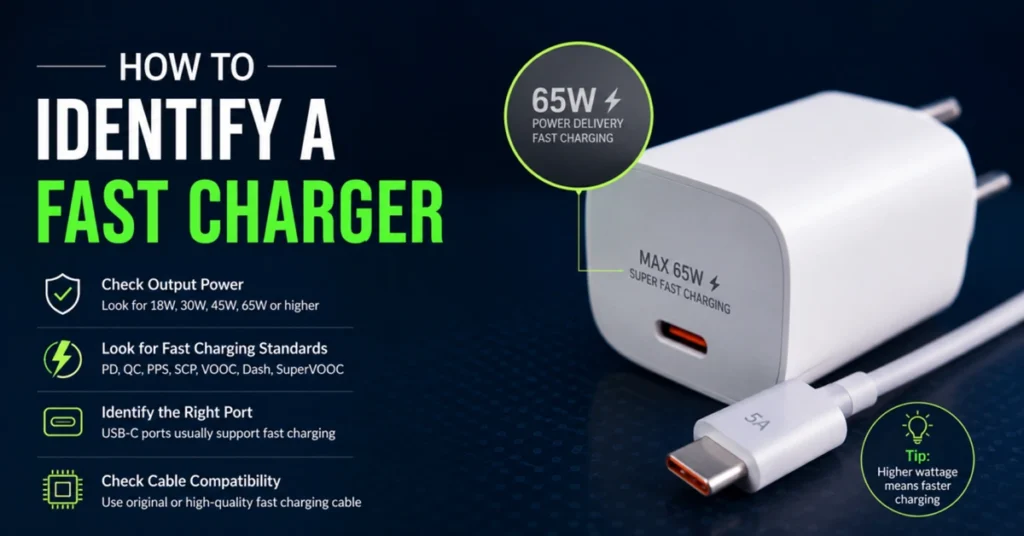
This is where most people get lost. Not every charger that looks powerful is powerful. Here’s exactly how to identify a fast charger:
1. Check the Wattage on the Label
Flip your charger over and look for a label or small print that shows output specs. It’ll look something like:
Output: 5V⎓1A → Standard charger (5W) — not fast
Output: 5V⎓3A / 9V⎓2A / 12V⎓1.5A → Fast charger (up to 18W)
Output: 5V⎓3A / 9V⎓3A / 15V⎓3A / 20V⎓5A → Very fast charger (up to 100W)
Rule of thumb: Anything 18W or above qualifies as fast charging for most smartphones. Laptops and tablets often need 45W–100W or more to charge at full speed.
2. Look for a Fast Charging Protocol Name
Fast chargers often advertise their supported protocol — a set of rules that governs how power is delivered. Common ones to look for:
| Protocol | Made By | Max Power | Common Devices |
|---|---|---|---|
| Power Delivery (USB-PD) | USB-IF | Up to 240W | iPhones, MacBooks, Android, PCs |
| Qualcomm Quick Charge (QC) | Qualcomm | Up to 65W | Android phones with Snapdragon chips |
| VOOC / Super VOOC | OPPO | Up to 240W | OPPO, OnePlus devices |
| Warp Charge | OnePlus | Up to 65W | OnePlus phones |
| Super Charge | Huawei | Up to 88W | Huawei/Honor devices |
| Adaptive Fast Charging | Samsung | Up to 25W | Samsung Galaxy devices |
| Mag Safe | Apple | Up to 15W | iPhone 12 and newer (wireless) |
If you see any of these names on the charger box or label, you’re holding a fast charger.
3. Look at the Connector Type
The connector alone won’t confirm fast charging, but it’s a clue:
- USB-A ports are older and typically cap out at lower wattages (though Quick Charge-enabled USB-A chargers exist).
- USB-C ports are far more capable and are required for USB Power Delivery (PD) above 18W.
- Two USB-C ports on a single charger often indicate a higher-wattage, multi-device fast charger.
If you’re buying a charger in 2025 and it only has USB-A ports, there’s a good chance it’s not the fastest option available.
4. Check the Box or Listing for “Fast Charge” Language
Retailers and manufacturers aren’t shy about advertising fast charging. Look for terms like:
- “18W Fast Charger”
- “45W GaN Charger”
- “65W USB-C PD Charger”
- “Compatible with Quick Charge 3.0”
- “Rapid Charge” or “Turbo Charging”
If the box doesn’t mention wattage or a named fast-charging protocol, assume it’s a basic charger.
Also Read – Nothing Phone 4A vs 4A Pro Review: The Best Mid-Range Phones No One Is Talking About Enough
5. Use a Watt Meter to Test It
If you already have a charger at home and want to know how fast it actually charges your specific phone, pick up a small USB power meter (also called a USB tester). It plugs between your charger and cable and shows you the real-time wattage being delivered to your device.
These cost around $10–$20 on Amazon and are a great way to cut through marketing claims.
Fast Charger vs. Regular Charger: Side-by-Side Comparison
| Feature | Regular Charger | Fast Charger |
|---|---|---|
| Typical wattage | 5W | 18W–240W |
| 0–50% charge time (phone) | ~60–90 min | ~20–30 min |
| Protocol support | None | USB-PD, QC, VOOC, etc. |
| Price range | $5–$15 | $15–$60+ |
| Best for | Overnight charging | On-the-go topping up |
| Battery wear risk | Low | Low (when used correctly) |
Does Your Device Actually Support Fast Charging?
Here’s a critical point most people miss: a fast charger can only fast charge a device that supports it.
If you plug a 65W USB-C charger into a phone that only supports 18W charging, the phone will still charge — just at 18W. No harm done, but no extra speed either.
How to check if your device supports fast charging:
iPhone users: iPhones from the iPhone 8 onwards support USB Power Delivery. For fastest charging, use an 18W or higher USB-C PD charger with a USB-C to Lightning cable (or USB-C to USB-C on iPhone 15+).
Android users: Check your phone’s spec sheet for “fast charging,” “Quick Charge support,” or the specific wattage listed under battery specs.
Laptop users: Look for the charger wattage your manufacturer recommends. A MacBook Air, for example, supports up to 67W charging.
GaN Chargers: The New Standard in Fast Charging
If you’re shopping for a fast charger today, you’ll likely come across the term GaN (Gallium Nitride). gaN chargers use a different semiconductor material than traditional silicon chargers, which allows them to:
Run cooler
Charge faster
Be physically smaller and lighter
Handle higher wattages in a compact form factor
A GaN charger that delivers 65W can be the size of a standard wall plug. For anyone who travels or works remotely, gaN is a massive quality-of-life upgrade. Brands like Anker, Ugreen, and Baseus have made GaN chargers widely available and affordable.
Does Fast Charging Damage Your Battery?
This is the big question — and the honest answer is: not significantly, when used properly.
Modern fast charging is designed with battery health in mind. Here’s why:
- Adaptive charging slows down once your battery hits ~80%, reducing heat stress.
- Temperature monitoring is built into most devices — if your phone gets too hot, it automatically reduces charging speed.
- Charge cycles are what actually degrade batteries over time, not charging speed alone.
Tips to keep your battery healthy long-term:
- Avoid leaving your phone plugged in at 100% for extended periods.
- Try to keep your battery between 20% and 80% when possible.
- Don’t use a cheap, uncertified fast charger — these can bypass safety protocols.
Red Flags: Signs You Have a Fake or Low-Quality “Fast Charger”
The market is flooded with counterfeit chargers that claim to be fast chargers. Watch out for these warning signs:
- No wattage listed on the label (or only lists “5V/1A”)
- No brand name or certifications (look for UL, CE, or FCC marks)
- Unusually cheap price for claimed high wattage
- Gets extremely hot during normal use
- Doesn’t charge noticeably faster than your old charger
- Your device doesn’t show a “Fast Charging” notification (many phones display this)
Stick to reputable brands or buy from manufacturers like Apple, Samsung, Anker, Belkin, or Ugreen.
Read Also – 10 Actually Useful Gadgets Worth Buying in 2026 (Honest Review)
Best Use Cases for Fast Charging
Fast charging isn’t always about pure speed. Here’s where it really shines:
- Morning rush: Charge from 10% to 50% in about 20 minutes before you head out.
- Long travel days: Top up during layovers or road trips without waiting around.
- Workday power users: Journalists, delivery drivers, and field workers who drain batteries fast.
- Laptop charging: Skip the bulky OEM brick and use a compact 65W or 100W GaN charger.
- Multi-device households: A single 100W+ multi-port GaN charger can handle a phone, tablet, and laptop simultaneously.
Conclusion
Fast charging isn’t just a marketing buzzword — it is a genuine technology shift that can save you time every single day. But the key to taking advantage of it is knowing how to identify a fast charger before you buy (or before you grab the wrong one from a drawer).
To recap: look for wattage above 18W, a named fast-charging protocol like USB-PD or Quick Charge, and a USB-C port. Make sure your device actually supports fast charging, and consider going GaN for your next charger purchase. Avoid suspiciously cheap, unbranded options — your battery will thank you.
Once you make the switch to a quality fast charger, you’ll wonder how you ever survived on 5 watts.
Frequently Asked Questions (FAQ)
Q: How do I know if my phone supports fast charging? A: Check your phone’s official spec sheet under the battery section. Most manufacturers list the maximum charging wattage. You can also plug in a fast charger — many phones display a “Fast Charging” or “Rapid Charging” notification on the lock screen.
Q: Is 18W considered fast charging? A: Yes, 18W is the baseline for fast charging on smartphones, especially for iPhones. For many Android flagship phones, 25W–45W is the standard fast charge speed, and some go even higher.
Q: Can I use a fast charger on a device that doesn’t support fast charging? A: Yes, you can. The device will simply charge at its normal, slower rate. Fast charging requires both the charger and the device to support a compatible protocol — if only one side has it, regular charging speed applies.
Q: Does fast charging reduce battery lifespan? A: Marginally and over a very long period. Modern devices manage heat and power delivery intelligently to minimize wear. Using a certified, reputable fast charger is key — uncertified chargers can bypass these protections and cause real damage.
Q: What’s the difference between USB-PD and Quick Charge? A: USB Power Delivery (USB-PD) is a universal open standard supported by Apple, Google, Samsung, and most laptop manufacturers. Quick Charge is a Qualcomm proprietary standard used in Android phones with Snapdragon processors. Many chargers support both standards.
Q: Is wireless fast charging as fast as wired fast charging? A: No, not yet. Wired fast charging is still significantly faster. Apple’s Mag Safe tops out at 15W wirelessly; some Android wireless chargers hit 50W or more, but wired charging at the same wattage is generally more efficient.
Q: Do I need a special cable for fast charging? A: Yes, sometimes. For USB-C fast charging above 60W, you need a cable rated for the required wattage and amperage — look for cables rated for 5A or that are E-Marked (a chip inside the cable that identifies its power rating). A cheap USB-C cable may limit your charging speed even with a powerful charger.
Q: How can I tell if fast charging is actually working? A: Many phones show a “Fast Charging” notification when plugged in. You can also use a USB power meter to see real-time wattage. Alternatively, time how long it takes to go from 10% to 50% — fast charging typically gets you there in 20–30 minutes on a modern smartphone.